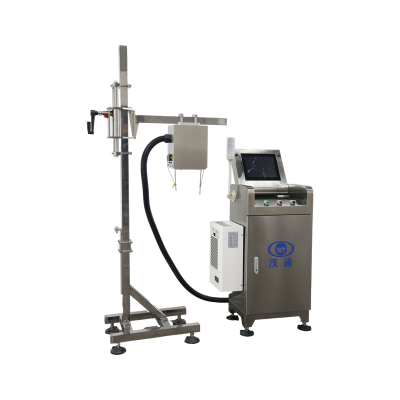
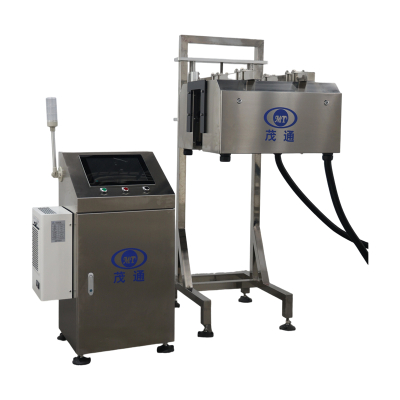
Catch Carton Inkjet Mistakes Early With Outer Box Coding Inspection
On beverage carton and outer-box lines, an unreadable or incorrect inkjet code can travel downstream unless it's checked right after printing. Outer Box Coding Inspection acts as an online, non-contact quality gate, verifying code presence and readability while cartons move on the conveyor. It then automatically rejects unqualified cartons. For buyers seeking consistent packaging traceability without relying on constant manual checks, Outer Box Coding Inspection is designed to make coding quality more reliable, shift after shift.

Where Outer Box Coding Inspection Fits on a Carton Line
Outer Box Coding Inspection finds its primary use in carton production lines for beverage cartons and outer boxes. Its main focus is online monitoring of inkjet coding quality and the automatic removal of defective cartons. A practical point for integration is its placement: the recommended installation spot is 1.5–2 meters directly behind the inkjet printer on the production line. This close positioning helps ensure that printing defects are detected and handled before cartons enter downstream packing or circulation steps, preventing costly rework and enhancing overall line efficiency.
Critically, the Outer Box Coding Inspection system can inspect cartons of various colors. This is a significant advantage in real-world plants where carton aesthetics often change across different product lines or SKUs. In many purchasing evaluations, this “various colors supported” capability is reviewed alongside the inspection speed requirement and the available space behind the printer, making it a versatile solution for diverse product ranges. For those defining what “inspection + rejection” entails on a carton line, a good starting point is to explore the product page for a Carton Coding Inspection Machine.
How the Online Inspection and Rejection Workflow Operates
The detection principle of Outer Box Coding Inspection is rooted in an inline workflow, leveraging digital imaging and automated rejection decisions. The process unfolds in five clear stages:

Operationally, this transforms routine code verification into a continuous, non-contact process—rather than pulling samples off the line for frequent visual review. This automation ensures consistent quality control without human error, a critical factor for high-volume production. For many production lines, the practical value of Outer Box Coding Inspection lies in its ability to seamlessly combine judgment (pass/fail) with immediate action (automatic rejection) within one consistent and highly efficient flow, significantly enhancing quality control.
What Defects Outer Box Coding Inspection Can Detect
The inspection scope for Outer Box Coding Inspection specifically targets inkjet printing quality and common coding errors that impact production information and traceability. The system's extensive defect coverage includes:
The product information provides detection performance figures based on theoretical experimental data. A low false-kick rate of ≤0.03% is stated, meaning very few good products are incorrectly rejected. The rejection rate is impressively high, listed as >99.8% for the “single character >30% missing” condition, >99.93% for fuzzy printing, and >99.99% for several other critical defects. For procurement teams, mapping these defect types directly to their operational reality is key to leveraging Outer Box Coding Inspection to prevent incorrect content or unreadable codes from reaching consumers or downstream processes, thereby protecting brand integrity and ensuring compliance.
Technical Features Buyers Usually Evaluate First
When assessing Outer Box Coding Inspection for integration into routine production, buyers often prioritize three fundamental "must-fit" criteria: speed, environmental protection, and operational ease:
In addition, the system description lists operational functions that support day-to-day quality management: AI self-learning, a configurable multi-level HMI, customizable functions, and automatic storage of daily defect images with configurable retention periods. Continuous rejection with automatic downtime handling and 24/7 remote support are also stated features. From an outcomes perspective, the stated positioning of Outer Box Coding Inspection is to reduce reliance on repetitive manual checking, maintain production efficiency through inline verification, and keep coding results aligned with the manufacturer’s technical standards, ultimately contributing to a more robust and cost-effective quality assurance process.
Key Specifications at a Glance
| Item | Outer Box Coding Inspection Specification |
|---|---|
| Inspection Method | Online, non-contact |
| Applicable Speed | Up to 60 cartons/minute |
| Installation Location | 1.5–2 m straight behind inkjet printer |
| Main Application | Carton production lines |
| Carton Colors | Various colors supported |
| Safety Rating | IP65 |
| Defect Handling | Automatic rejection |
Practical Setup Checklist for Outer Box Coding Inspection
For implementation discussions, the Outer Box Coding Inspection system is typically scoped using a straightforward checklist, aligning with its published operating principles and specifications. This ensures a smooth integration and optimal performance:
If your next step involves a quote or a detailed configuration discussion, you can find the official product page here: Outer Box Coding Inspection.