Outer Box Coding Inspection Keeps Inkjet Codes Readable at 60 CPM
In beverage carton and outer-box packaging, an inkjet code truly serves its purpose only when it's present, legible, correct, and accurately positioned. When codes fade, blur, shift, or are duplicated, downstream scanning and traceability become challenging. Manual spot checks, realistically, can't keep up with modern production speeds.
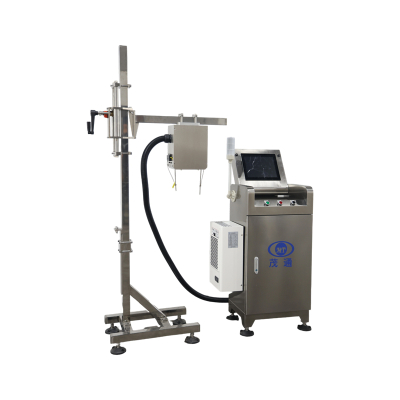
The Outer Box Coding Inspection system is specifically engineered for online, non-contact inspection of inkjet coding quality on carton and outer-box production lines. It captures each carton code with a Gigabit digital camera, performs digital image analysis, makes a qualified/unqualified decision, and automatically removes cartons with defective coding. It achieves an applicable production speed of up to 60 cartons per minute, with image collection available from the top or side of the carton.

What the System Does on a Running Conveyor
This system acts as a critical, closed-loop quality gate positioned between printing and packing stages. Instead of waiting for end-of-shift checks, it evaluates coding quality as cartons move past the inspection point. Being non-contact, it inspects without ever touching the carton, which ensures stable operation even on high-speed conveyors.
Its inspection scope zeroes in on inkjet printing quality. Simply put, the system verifies the code's presence, legibility, content accuracy like date or plant/security codes, and correct positioning within the designated area. Crucially, it then links this decision to an automatic rejection action.
How Outer Box Coding Inspection Tracks, Decides, and Rejects
The workflow seamlessly coordinates positioning, image acquisition, digital analysis, tracking, and rejection. Typically, installation requires a 1.5–2 meter straight conveyor section immediately behind the inkjet printer, facilitating a clean, uninterrupted sequence from printing to inspection to removal.
Step-by-Step Inspection Workflow
This precise sequence is crucial for procurement teams, as it directly links each specific carton to a definite quality decision at the exact moment and position on the conveyor. This ensures accurate rejection, eliminating the need for uncertain “best guess” removals.
Defects Outer Box Coding Inspection is Designed to Detect
The system effectively covers common inkjet failure modes found in carton packaging lines, from missing codes to positional errors and duplicated prints. Its detection performance is backed by theoretical experimental data, boasting an impressive overall inkjet printing inspection false-kick rate of ≤0.03%.
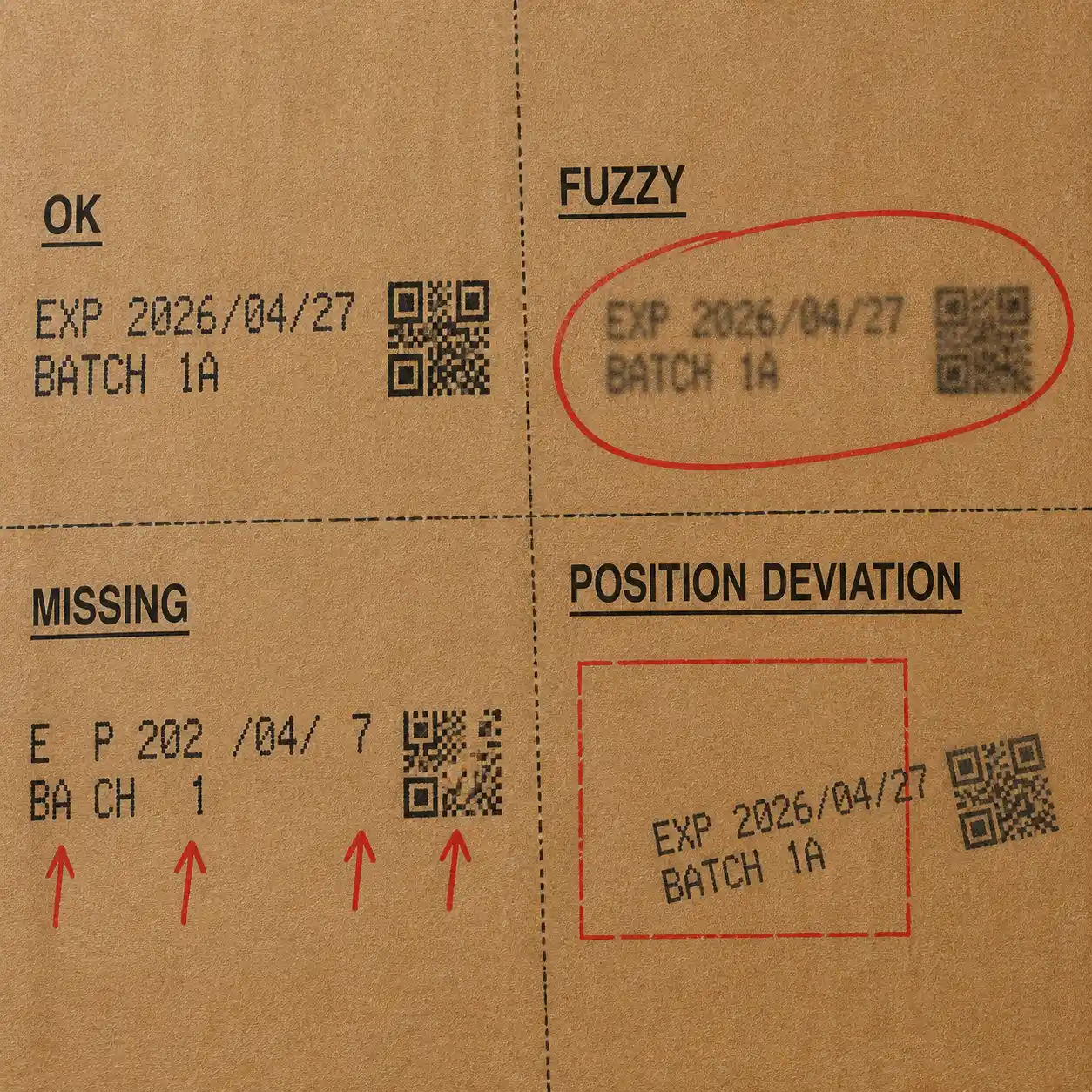
| Defect category | Defined condition | Documented theoretical rejection rate |
|---|---|---|
| No inkjet printing | Code absent | >99.99% |
| Missing inkjet printing | Single character >30% missing | >99.8% |
| Fuzzy inkjet printing | Characters indecipherable to the human eye | >99.93% |
| Incorrect inkjet printing | Incorrect production date, incorrect factory code, incorrect security code, or deformation (elongation or shortening) | >99.99% |
| Position deviation | Exceeding the expansion zone | >99.99% |
| Duplicate inkjet printing | Multiple codes printed within the code area | >99.99% |
To put the “no coding” performance into perspective, documentation states that out of 10,000 unqualified products lacking coding, a theoretical maximum of just 1 might not be rejected.
Operational Features Buyers Typically Evaluate
Beyond its core capabilities of Gigabit camera integration, sensor triggering, and encoder recording, the system offers robust operational features that streamline day-to-day line use:
For teams tasked with specifying equipment for multi-shift operations, these features are frequently evaluated alongside critical factors like target line speed up to 60 cartons per minute and the specific defect categories it addresses, including missing, fuzzy, incorrect content, position deviation, deformation, and duplicate prints.
Where It is Commonly Applied and Why It Matters
Primarily, the system finds its application in carton production lines, adept at inspecting cartons of diverse colors. The production benefit is clear: it significantly reduces reliance on manual inspection, simultaneously boosting consistency by automatically removing cartons that fail to meet defined inkjet coding requirements.
From a procurement perspective, Outer Box Coding Inspection is often viewed as a vital tool for standardizing code quality control. It works by detecting and tracking each carton, capturing and analyzing printed information online, and then automatically removing any unqualified cartons. This ensures the subsequent process step receives a cleaner, fully compliant product flow.