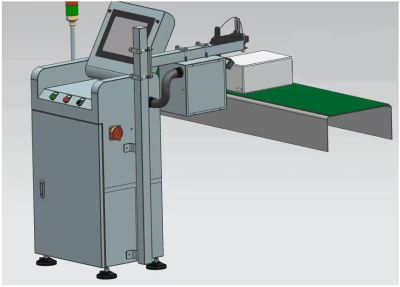
Can Code Inspection Machine Keeps Lines Traceable
A Can Code Inspection Machine plays a practical role on high-speed beverage can lines: it checks whether the inkjet code on the can bottom is present, readable, correctly positioned, and consistent with production requirements. By combining online optical inspection, character recognition, encoder-based tracking, and automatic rejection, the system helps prevent cans with missing, blurred, incorrect, or duplicated codes from moving further down the line.
Why Bottom Code Inspection Matters on Can Lines
On modern canning lines, manual checking cannot keep pace with continuous production. A Can Bottom Code Inspection Machine is designed for online inspection of inkjet printing on the bottoms of cans in high-speed production environments. Its core purpose is straightforward: identify defective or missing bottom codes and remove unqualified cans automatically.
A Can Code Inspection Machine supports traceability because the bottom code often carries date, factory, batch, or anti-counterfeiting information. If this information is absent or unreadable, downstream quality review becomes harder, and product identification may be affected. Inline inspection keeps this checkpoint close to the printing process, so problems can be found before they spread across a larger production batch.
How the Can Code Inspection Machine Works
The inspection process follows a synchronized inline workflow. First, cans pass a positioning sensor, which detects their arrival at the inspection point. The control unit records the can identification number and the current encoder signal. The sensor then triggers a Gigabit Ethernet digital camera to capture an image of the can bottom code from above.
After image capture, the code image is transmitted to the image processor. The software analyzes the inkjet printing information, then sends results to the HMI and control unit. If a can is judged unqualified, the control unit instructs the rejector to remove it from the line. Because rejection is linked with encoder signals, the Can Code Inspection Machine can maintain accurate rejection even when the line speed changes or temporarily stops.
Key Functions for High-Speed Production
The system is designed for inspection speeds of up to 72,000 cans per hour, equal to 1,200 cans per minute. For beverage producers, this matters because code inspection must match line speed rather than become a bottleneck. The Can Code Inspection Machine uses non-contact online inspection, so it does not damage cans during checking.
Its multi-module design supports comprehensive, no-dead-angle detection, including 360° coding inspection coverage. The latest-generation inspection software filters interference from can-bottom logos or scratches, helping reduce unnecessary false rejects. The equipment also includes an intuitive HMI with multi-level access control, fast training for new code patterns, 24/7 remote access, and a built-in industrial-grade air-conditioning system for stable operation in high-temperature environments.
Defects the System Can Detect
A Can Code Inspection Machine is built to inspect several common code defects found in real production. These include missing prints, cover prints, inverted cans, blurred characters, wrong date codes, wrong factory codes, wrong security codes, character deformation, position offsets, and duplicate codes within the code area.

For missing character inspection, the system can recognize single-character loss greater than 20%. For unreadable printing, it flags fuzzy inkjet codes that cannot be recognized by the human eye. For incorrect code inspection, it can identify wrong dates, wrong factory codes, wrong anti-counterfeiting codes, and deformation. This capability is especially useful when previously produced cans are reintroduced to the line, because outdated date codes can be detected and rejected.
Inspection Accuracy and Rejection Control
The Can Code Inspection Machine is specified with strong detection performance across key inspection items. No-code inspection, incorrect inkjet printing inspection, position offset detection, and duplicate code detection are listed with rejection rates above 99.99% under the stated test conditions. Missing inkjet printing for a single character greater than 20% is listed above 99.8%, while fuzzy inkjet printing is listed above 99.93%. The false kick rate is controlled at ≤ 0.03%.
This balance matters in daily production. A good inspection system should not only find defective cans; it should also avoid rejecting qualified products unnecessarily. Encoder-based synchronous counting, zero-delay detection, and stable image analysis help the Can Code Inspection Machine support both quality control and production efficiency.
Data Storage and Daily Quality Review
Beyond pass-or-fail inspection, the system automatically stores defect photos for rejected cans. These records are organized by day, and the storage period can be adjusted to match quality review needs. For production teams, this provides visual evidence for recurring printing problems and makes it easier to review trends related to inkjet stability, code position, or environmental interference.
The Can Code Inspection Machine also supports continuous rejection and auto-stop functions, helping prevent defective cans from accumulating when a printing issue persists. When used consistently, inspection data can guide upstream improvements in printer setup, code training, and production environment control.
Installation and Operation Considerations
For best results, the system should be installed closely after the inkjet printer. This position allows the Can Code Inspection Machine to detect code defects early and reject unqualified cans before they move further along the line.
Operators should keep inkjet printing stable, review stored defect images regularly, and adjust code training when production changes. When line conditions are well controlled, the Can Code Inspection Machine becomes more than a final checkpoint—it becomes a practical tool for maintaining traceable, readable, and compliant can-bottom codes in continuous production.
FAQs
What does a Can Code Inspection Machine inspect?
It inspects inkjet printing on can bottoms, including code presence, readability, content accuracy, position, missing characters, and duplicate printing.
Where should the system be installed?
It is typically installed closely after the inkjet printer so defective codes can be detected early in the production flow.
Can it work on high-speed can lines?
Yes. The system is designed to support inspection speeds of up to 72,000 cans per hour.
How are defective cans removed?
The system uses encoder-based synchronous tracking and an online rejector to remove unqualified cans at the correct position.
Does the inspection touch the cans?
No. It uses non-contact online optical inspection, so the checking process does not physically damage the cans.
What happens to defect records?
Defect photos are automatically stored, organized by day, and retained for an adjustable period to support quality analysis.